Thursday, July 11, 2013

Google’s Matt Cutts On Why Links Still Rule & How SEOs Go Wrong In Getting Them

Eric Enge has published an interview with Matt Cutts, Google’s head of search spam. The interview is similar to the format he published in 2010 with Cutts, but in this interview, the topic revolved mostly about link building and what is wrong with how SEOs do it today.

In short, Matt Cutts would love a world where link builders thought first about the content or web site and why that web site is worthy of a link, versus first being concerned about getting links. In the interview, the two discuss if link building is legal or illegal, if press releases should be used for link building, the problem with content syndication and guest blogging – plus much much more.
Here are some key takeaways from the interview, but make sure to read the full interview over here.
  • Link Building Is Not Bad: Just don’t try to get the link first, have compelling content people want to link to instead.
  • Press Releases Links: They still “probably not count” but your goal should not be the link but the exposure the press release gives you to editors who may read them and cover your story.
  • Content Syndication: If your content is being syndicated on other sites, give Google signals to know you are the original source. Make sure you publish well before others, possibly use rel=canonical, link to main source of content, and maybe use authorship.
  • Problem With Guest Posts: A large number of people are doing it the wrong way, guest posts have become more like article directories or article banks these days.
  • Links: Links are still “the best way” to rank content.

Friday, July 5, 2013

New AdWords Integration Platform

Advertisers like to see reports in Analytics which are fresh - reflecting their up-to-the-minute AdWords settings - and consistent with the AdWords reporting. Today, Google Analytics is excited to announce that it is rolling out a new AdWords integration infrastructure for our advertisers to realize these benefits. More importantly, the new integration is laying a foundation for adding new AdWords dimensions quickly -  such as Ads - and paving the path for a rich set of reports such as enhanced campaign bid adjustments and Google Display Network targeting settings. Highlighted below are a few ways in which the new platform will start impacting AdWords reports in Google Analytics.
Improved data freshness and consistency
With the new infrastructure, reports will reflect the most recent AdWords settings such as campaign or ad_group names keeping them fresh and consistent with AdWords. In the example below, a user has renamed their campaign thrice from “Big Deal”   “Big Deals”   “Big Deal - Car Accessories”. In the current reports, visits are attributed to the three different campaign names while clicks are attributed to the newest campaign name. After this change,  both visits and clicks metrics would be associated with the most recent campaign name: “Big Deal - Car Accessories”, thus collapsing multiple rows into a single row.
Current Behavior
Campaign
Visits
Impressions
Clicks
Big Deal
542
0
0
Big Deals
381
0
0
Big Deal - Car Accessories
72
68724
1023
New Behavior
Campaign
Visits
Impressions
Clicks
Big Deal - Car Accessories
995
68724
1023
Laying the foundation for richer reporting
The new integration is laying the foundation for adding new AdWords dimensions quickly and for creating new reports with speed. Very soon, advertisers would be able to access reports based on their Enhanced Campaigns’ targeting settings; reports containing rich information to help fine tune ads targeting settings and bid adjustments for improved ROI (Return On Investment).
Show and hide AdWords data via linking
The new integration allows users to show or hide data for auto-tagged AdWords accounts by linking or unlinking the account to a profile. If a user un-links an Adwords account from a profile, all historical data pertaining to the account would be hidden by rolling them up into (not set).

Wednesday, July 3, 2013

Advantages of Social Bookmarking in List Building

Social presence is one of the essential factors to help you draw clients in your list. It is a way for every online marketers especially list builders to be immersed in the growing community in the net where target market is just wandering around waiting for someone who can take them to their proper places. With the vast and growing number of online users, online business opportunity has great chances to flourish and generate income. Thus, social presence is a great avenue for online marketers to hone and attract potential target market.

Needless to say, social networking sites generate traffic due to the thousands of followers they have. These followers come from different age brackets with different interests. Through this, chances of getting potential clients are high. However, there are certain things to employ knowing that these potential clients are likely to cling with online marketers that possess credibility and knowledgeable of their niche.

The knowledge and credibility of list builders and other online marketers are challenged with how to present themselves. That is why to gain such, let us try to dwell on what can social bookmarking does in the quest for building one's list and generate income.

Social bookmarking is a method of social networking that helps list builders to establish traffics in their site. This is also a great avenue to start searching prospects that are not just qualified but are also responsive. The system of bookmarking is easy. Using article or blogs to market your product just save them to popular bookmarking sites and categorize them according the niche you are promoting. Since you are projecting that others will read your articles, always have it saved publicly. In this way, it will be accessible to your target market.

The advantage of social bookmarking is that you cannot just save your own craft but you can also save sites that you wish to visit and make market. However, your credibility should be your foundation in order that clients will trust you. Through your written crafts, you can gain this reputation. The more people reads your article and vote for it, popularity follows that help generate traffic. Creating good and valuable contents will only be your capital in doing this.

With this method, your avid readers will always link to your content. It is, then, that you can invite them to your own site and have the chance to build your list where you can also promote your product.

Social presence is very important in online business. However, in marketing you should always provide your readers good and quality contents of your article to attract them. Thus, your mailing list expands and profits will flow.

Article Source: http://EzineArticles.com/5696056

Monday, July 1, 2013

Website Satisfaction By Google Consumer Surveys

If you are like most business owners, you know how important a healthy online community is to your business’s success. Traditionally, collecting user feedback has been an expensive and time-consuming process, but now you can hear from your site visitors for free using Google Consumer Surveys.
Website satisfaction surveys allow you to easily create customer satisfaction surveys in order to stay in tune with what your customers think. All you have to do is paste a small snippet of code in the HTML for your website. This will load a discreet satisfaction survey in the lower right hand corner of your website so you can get immediate feedback from your users. 
Users will be asked to complete a four-question satisfaction survey. Surveys will run until they have received 500 responses and will start again after 30 days so you can track responses over time. This is currently limited to US English visitors on non-mobile devices.
The default questions are free and you can customize questions for just $0.01 per response or $5.00 for 500 responses. By using Google Consumer Surveys to measure website satisfaction you automatically get aggregated and analyzed responses, provided to you through a simple online interface.

Benefits of Social Bookmarking Services

Various companies use different types of marketing strategies to grow their business effectively. No matter what type of business you have, it is necessary to use great marketing strategies. You can get the desired target audience with social bookmarking. It is one of the best ways to store and sustain your webpage online. It is an online method for organizing, sharing and searching bookmarks of selected web pages. It helps in storing any information and can be accessed from anywhere and anytime. They are stored in tags and can be easily shared with friends and colleagues. In simple words, they are bookmarking a webpage for future use.

Usage of social bookmarking will surely help to boost web traffic to a larger extent. It is an effective SEO strategy. It greatly helps website in building online popularity. Instead of every time typing on the search engine bar for any information, it is better to bookmark a page. Websites all over are implementing bookmarking strategy for multiple benefits. It is highly outcome oriented and a cost effective process. As the web pages are bookmarked, you can access them from any computer or laptop. It helps to save bookmarks on a public website and tag them. However, though it is saved on a public webpage, only the certain people can view these social bookmarks sequentially by category or tags or using a search engine.

The trend of social bookmarking is catching up these days. With this, you can bookmark any webpage, blog and article. It often involves the process of posting comments which are used as an outlet to chat and discussion. The posted comments mostly includes the URL of the website which ultimately helps in establishing link from social network website and add on to the link network of the source website. It is one of the major building blocks for driving traffic to your website. With this, you can easily trace your favorite website that you regularly website. Many bookmarking websites permits users to browse through the tagged sites based on the popularity. The tagged websites are categorized such as shopping, beauty, travel, education, etc.

Procedure of bookmarking is time consuming if done alone. In such a case, it is recommended to hire social bookmarking service from a professional SEO firm. They have experienced and qualified staff well versed with online marketing strategies and understand whole legal method and submission guidelines. Hiring reputed services will yield many benefits. They help to improve its performance in search engine results. The experts completely analyze the online business and start submitting in social networking websites. The service mainly consists posting of comments in famous social networking websites. They offer large number of packages that are tailored to suit your specific needs and requirements. Hiring them will increase website visibility and branding. It will build up social network exposure.

Article Source: http://EzineArticles.com/7087295

Sunday, June 30, 2013

Google Displaying Company Google+ Logos In Search Results With & Without Rel Publisher

Google is now showing Google+ logos and icons for company profiles in the rich snippets portion of their search results listings.

Ross Hudgens spotted the Google+ icon displayed next to the search result for the company’s listing. Rel=publisher markup is not required for the logo to show up. I believe all that is required is for the company to have a Google+ page that has their website verified in their Google+ profile.
For example, travelstart.ranks for [flights] in Google South Africa. Notice the Google+ logo:
google+publisher-icon
They clearly have no rel=publisher markup code on their home page. In fact, if you analyze the page with the structured data tool, you will notice there is no schema on the page at all. However, if you look at their Google+ profile page, you will notice they have a verified website listing.
Less than two months ago, Google told us that publishership isn’t coming to Google anytime soon. In fact, they told us they had “no plans” to bring it to the search results. While it’s true that this is not using publisher code, it does look like the concept of author snippets are coming to Google’s search results as publisher snippets.
You can see the same even in Google.com for [Phoenix East Aviation]:
pea
They happen to have rel=publisher markup on the page but also have a verified website in their Google+ profile.

If this does happen to be coming to Google’s search result, you better expect to see more and more adoption of rel=publisher markup and Google+ adoption by businesses, non-profits and other organizations in the near future.

2013 Google Ranking Factors From Netmark

Yesterday, we covered the 2013 ranking factors from SearchMetrics, now let us share with you the Google ranking factors from a different company named Netmark.

You can learn about Netmark’s methodology for determining these ranking factors over here, and you can see all the ranking factors over here.

Here the top 10 ranking factors from the study:
top-10-factors
Netmark also shows you the top ranking factors broken down by backlinks, social media, on-page, authority scores, search volume, and ratio.

Source

Sunday, June 2, 2013

AdWords Bulk Uploads Now Available For Ads And Ad Groups

Google is following up last month’s launch of keyword bulk upload from the Web UI with bulk uploads for ads and ad groups.

By clicking the “Editable” box before downloading a report from AdWords, you’ll be able to make changes to ad creatives, pause ad groups or change budgets within the report. A good piece of advice from Google is to save your original report as there is no way to revert back after uploading changes.


In the Excel spreadsheet, you’ll see “Action” in the first column. This is where you signal changes to AdWords; if you leave this blank, the system will ignore the row. The three options are: Add, Remove, Set. “Set” can be used when changing an ad or ad group from “enabled” to “paused”. You’ll then also need to make the change in the Ad Status column. “Set” can also be used to change an ad group’s maximum CPC or destination URL.

To upload your changes, click “Reports and uploads” in the left-hand navigation (the same area where “Shared Library” is located) and then click the “Uploads” tab.

You’ll then see a status report in the Uploads table. 

Will Enhanced Campaigns Drive Mobile CPCs Down?

There are two pieces of conventional wisdom surrounding Google’s Enhanced Campaigns that seem to get tossed around a lot without much thought or examination.

The first is that this new campaign model will make it easier for small advertisers to get into the mobile advertising game. The second related piece is that Enhanced Campaigns will likely lead to higher mobile CPCs and that this is one of Google’s primary motivations for changing its model.

I have personally been guilty of echoing both of these sentiments to varying degrees — but as we get closer to the mandatory transition in July, the conventional wisdom seems less convincing. Maybe it is the contrarian in me, but I think there is a decent argument to be made that the move to Enhanced Campaigns will lead to lower mobile CPCs in the near term, but higher overall CPCs.

Will Enhanced Campaigns Really Bring In More Mobile Advertisers?

At RKG, we manage large-scale, enterprise-level paid search programs, so we don’t have much direct insight into how the typical mom and pop organization sets up their AdWords program. But, it’s important to note that the default setting for a legacy AdWords campaign is to target all devices, and Google even includes a recommendation that new advertisers keep that setting:
adwords-default-device-settings
So, it has required some effort to opt out of mobile entirely, and a certain amount of knowledge and motivation to do so.  In his article a few months back, Larry Kim noted that only 1 in 25 SMBs were creating separate, mobile-optimized campaigns. That sounds reasonable, but it is not the same as saying only 1 in 25 SMBs are advertising on mobile devices.
The bottom line is that Enhanced Campaigns may simplify bidding segmentation for less sophisticated advertisers, but it doesn’t make it any easier to turn on mobile. To the extent that SMBs have been sophisticated enough to know that smartphone traffic should be segmented, but have been unwilling or unable to do so and simply turned it off, this change will lead to greater mobile adoption.
It’s unclear, though — at least to me — that this comprises a large enough group to have an appreciable impact on the competitive landscape for the larger players in the industry.

Mobile CPCs Are Already Higher Than They Should Be

For all the consternation Google stock watchers express over the size of the smartphone to desktop CPC gap and why it isn’t closing faster, the reality is that mobile CPCs are likely higher than they ought to be for most advertisers.
Most industry reports show smartphone CPCs running somewhere around 50-60% of desktop levels, while tablet CPCs run at 90%-100% of desktop levels. Performance breakdowns on the conversion side are scarcer, but over the last several years, RKG has consistently found average revenue per click (RPC) for smartphones running far below the RPCs of computers and tablets.
In the first quarter of 2013, smartphone RPCs were just 23% of those for computers. If those results are fairly representative of the industry, it suggests that advertisers are placing a pretty hefty premium on smartphone traffic.
While there are a number of rational reasons why advertisers would be willing to accept a lower directly measurable return on ad spend (ROAS) for smartphones — cross-device purchases, offline spillover, and other tracking difficulties, to name a few — do all of these elements really add up to a level that justifies an online ROAS that is roughly a third of that for desktops and tablets?
For many, if not most, the answer is probably no. With mobile generating an ever-growing share of advertisers’ traffic and Enhanced Campaigns forcing all Google advertisers to reassess their mobile strategy, we could see increased scrutiny lead to tighter efficiency targets that ultimately push down smartphone CPCs. How might that play out?

How Lower Smartphone CPCs Could Benefit Advertisers & Google

Let’s consider a fairly simple but hopefully realistic scenario. An advertiser’s goal for their AdWords program is to achieve a measurable ROAS of $5. As long as they can hit that efficiency target, they will keep investing more ad dollars into the program.
With smartphone CPCs at 60% of those for computers and tablets, the advertiser sees smartphones generate 15% of their traffic. Their revenue per click for smartphones is just 25% of that for desktops and tablets, though. Throwing in some specific values, we might get campaign performance stats that look like this:
enhanced-campaigns-example1
Overall, the advertiser hits its efficiency target and generates over $3.5K in revenue. But by the definition of this scenario, they are more efficient on the desktop and tablet segment than they need to be and not hitting their target for the smartphone segment.
Our hypothetical advertiser is an online pure-play and believes that the extrinsic, or at least difficult to measure, revenue impacts from smartphones are roughly equal to those for other devices and decides that both segments must hit the same efficiency target. They bid up the desktop and tablet traffic, and pull back significantly on smartphone bids as shown below.
enhanced-campaigns-example2
In total, click volume falls a bit, but the advertiser is able to generate more revenue, spends more and pays a higher overall cost-per-click. Seemingly, this would be a win-win for the advertiser and Google.
Okay, in the real world, there are plenty of complicating factors that make it difficult to extrapolate the scenario above to the larger AdWords ecosystem. Not all advertisers share the same goals and metrics for success, or even operate on a rational level. Those differences may also be spread inconsistently across advertisers.

In addition, the changes in traffic levels above are based off of Google’s own Bid Simulator data; but, were all advertisers to make a similar move at the same time, we wouldn’t expect the same result. There are a finite number of desktop and tablet searches and ad inventory; and, if advertisers bid more, that doesn’t change.

We must also consider the effect Google has directly had on influencing mobile click costs and how that might change under the Enhanced Campaigns model.

Smart Pricing

If you Google (or Bing) the phrase “AdWords Mobile Smart Pricing,” you’ll have trouble finding authoritative and accurate information on the subject. There was, however, a point in time when Google’s AdWords help pages offered some detail on how they would adjust CPCs based on device for campaigns targeting all devices.

When I did comparison of mobile and desktop CPCs for RKG a couple of years ago, I found that, all else being equal, mobile CPCs were 41% lower than desktop — not dissimilar to most of the figures you hear today. At the time, I offered speculation on other factors that could have led to the observed results, but I now believe that Google’s smart pricing was far and away the primary driver of that differential.
Why does that matter now? There are reports out there noting that smart pricing will be going away with Enhanced Campaigns, and this could be a big wildcard in how the landscape evolves over the next few months.

Large and sophisticated advertisers should adjust quickly to that new reality, but it will likely take much longer for others to get a handle on what is happening with their AdWords program. During that period, it’s hard not to see Enhanced Campaigns as levying a form of tax on those that aren’t able to accurately assess the value of their traffic from each of the two broad device classes that exist under the new model.
We may never get a precise read on this, but the Enhanced Campaigns transition seems likely to drive mobile CPCs up for some, but down for others.

Google’s Real Incentive For Mobile Search Ads

Rightfully, Google cares more about the revenue they generate than what their average CPC is overall or for smartphones, specifically. If mobile clicks are overpriced, it hurts advertiser efficiency and should lead them to decrease their total investment in search ads. The notion that Google would engineer Enhanced Campaigns the way it did in order to drive up mobile CPCs, without generating additional value to advertisers, doesn’t make much sense in the long term.
Google’s real incentive when it comes to mobile is to help advertisers find and accurately quantify any hidden value it presently holds. Google is uniquely positioned to do this, given the myriad ways it has to identify and track users.

At Google I/O a couple of weeks ago, we heard more about how cross-device tracking will work in Google Analytics. I’d expect to see more of this, and it’s less a question of what Google can do in this area than what they should or will do as they try to strike a balance between addressing the concerns of its users and the wishes of its advertisers.

Sorry, BuzzFeed: Pinterest Isn’t A Better Search Engine Than Google

I went on a BuzzFeed diet about a month ago, where I stopped following the site and reading the content there. I should have stuck to it, because I wouldn’t be wasting my time now dissecting one of its stupid, pageview-baiting stories. In this one, Pinterest is positioned as a better search engine than Google.
The story runs through 10 examples illustrating how Pinterest “beats” Google “nine out of ten times.” But despite the headline, these aren’t examples of Pinterest being a better search engine than Google. They’re examples of Pinterest supposedly being a better image search engine than Google, which is a huge difference.

Pinterest As Best Search Engine?


For example, say I’m trying to find a site like BuzzFeed itself. I’d probably go to a search engine and enter “BuzzFeed.” On Pinterest, I get this:

Which link takes me to BuzzFeed? None of them, because they aren’t links to sites, they’re links to pictures. The biggest picture with the BuzzFeed logo isn’t even from the BuzzFeed Pinterest account. The one of the right of that is, through a repin. With some clicking, I’d eventually get to the BuzzFeed site.

Thursday, May 16, 2013

Google Zaps Another Link Network, ‘Several Thousand’ Link Sellers Hit

What a week it’s been where Google and SEO are concerned. The company, via Matt Cutts, has issued several warnings about things to come — and, late Tuesday night, also revealed that it’s just acted against another link network.

In a pair of tweets, Cutts — the head of Google’s webspam team — said that Google has taken action against “several thousand” link sellers that were part of a link network that bought and sold links that pass PageRank.

I can’t speak (or guess) to what network was hit, but these sites can’t claim they weren’t aware of what might happen. On Monday, Cutts published a video that included a warning about Google’s plans to go “upstream” in its fight against spammy links. He also offered a specific warning against link networks at our SMX West conference in March.

New Google Analytics Filter Fields

One powerful feature of Google Analytics is the ability to create filters to limit and modify the traffic data that is included in a profile. Custom filters can be made on specific fields of data; our users have long been asking for more data to filter, especially for mobile and social. We have listened, and are glad to announce an expanded fields list. Full descriptions of the new fields and values are documented here, and following is a summary:
Mobile
  • Is a mobile device
  • Is a tablet
  • Mobile brand name
  • Mobile model name
  • Mobile marketing name
  • Mobile pointing method
  • Mobile has QWERTY keyboard?
  • Mobile is NFC supported?
  • Mobile has cellular radio?
  • Mobile has wifi?
Social 
  • Social network
  • Social action
  • Social action target
Content & Traffic
  • Hit type: (page, social, transaction, etc.)
  • Internal search term
  • Internal search type
Audience / Users
  • Browser size
  • IP version
E-commerce
  • Local currency code
Use these new filter fields for improved data analysis and for more refined and targeted reporting views.

Google Analytics at Google I/O

We’ve been working hard getting ready for Google I/O! We're livestreaming our presentation on how to optimize web and mobile apps across devices using Google Analytics on Thursday, May 16 at 1:40pm PT and we’d like to invite everyone to join us.

We recently launched Universal Analytics, a new way to measure user interactions across any device / platform / environment. By measuring this data, developers can better optimize their applications. In this session we'll discuss how to measure user-interaction from any device as well as demo new reports and best practices to optimize both web and mobile apps.

For those of you who are going to be at I/O, please stop by the Ads sandbox and say hi to the Analytics team! We’ll be around to answer questions, and we may even have some pretty cool Analytics gear to give out. Be sure to check out all of our Analytics sessions. You can find the full schedule here.

Monday, April 1, 2013

4 Improvements To Google Analytics Real-Time Reports

Real-time reports provide useful insights for businesses that help them understand how their systems are reacting, instantly, such as when you send out an email campaign or engage in marketing that has a temporal nature. It provides alerting / intelligence, giving insight into things that are new or different such as a sudden increase in site traffic. Real-time also lets you win social by capitalizing on trending topics. For example, if you noticed a blog post you published previously is suddenly gaining attention due to something happening in the news, you could highlight it on the front page of your site to draw additional attention and ‘pour fuel’ on the social fire. 

Today, we're announcing 4 improvements to real-time reports. You can now:
  1. Analyze Events in real-time
  2. Breakdown real-time by Desktop/Tablet/Mobile traffic
  3. Create shortcuts to your favorite real-time segments
  4. Compare real-time filtered data against overall real-time data
Let’s go through the changes in more detail:
1. Realtime Events Report
With the real-time events report, you can now not only see the top events as they occur but also filter on particular event categories (and actions). Additionally, you can see whether particular segments of visitors trigger different events and debug your events deployment in real time.
To access this report, navigate to the real-time section of Google Analytics and click on the Events section. You should see a report similar to this:
Clicking on any of the Event Category will drill down and show all the Event Actions and Event Labels for that particular category.
If you are trying to see what events a particular segment of visitors generate, that is easy as well. Any filters you set up in any part of real-time are preserved in the Events report. For example, in the above screengrab we have set up a filter here to see what events are triggered from visitors coming via organic search.
2. Content Breakdown by Desktop/Tablet/Mobile
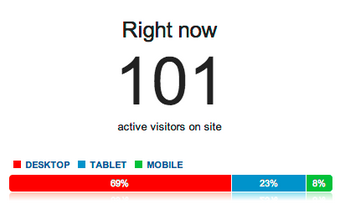
We live in an increasingly multi-screen world, and now you can see in real-time the type of device that visitors are using to visit your web site (desktop, tablet and mobile). This is available in the content report as shown below:
As with real-time reports, you can easily see your visitors filtered by the device type (by clicking on either of “Desktop” “Tablet” “Mobile”).
3. Shortcuts for your important real-time segments
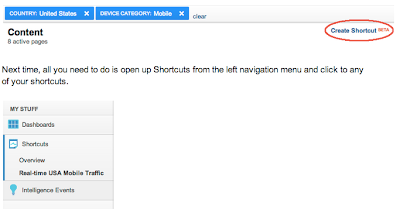
We’ve heard from users that you like to look at certain segments of visitors in real-time, but dislike setting up the filters each time. Now, you can use the “Create Shortcut” feature to store your favorite segments. 
Now all you need to do is open up Shortcuts from the left navigation menu and click to any of your shortcuts.
4. Comparison real-time to overall data
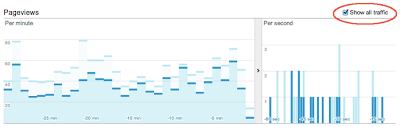
Finally, you can compare the pageviews of your segmented visitors to overall traffic as shown below. This is nifty if you want to see quick comparison trends. For example, many times, after a G+ post, I create a filter by device type of “Mobile” and can see that the mobile traffic picks up much faster and also contributes more to the initial increase in pageviews.
Stay tuned for continued improvements to real-time, a growing area of importance for your digital marketing.

Wednesday, March 20, 2013

5 Things You Should Be Doing With Google Mobile App Analytics Crash & Exception Measurement

When an app crashes, it disrupts the user experience, may cause data loss, and worst of all, might even cause users to uninstall the app altogether. As developers, we do our best to minimize crashes, but no app is ever perfectly stable.

A crash can actually represent a great opportunity to improve an app and one of the best things we can do as developers is to measure our crashes and exceptions.

The crashes and exceptions report in Google Mobile App Analytics.
Measuring crashes in your app can help you make better a product, make more money (if that’s your thing), and use your development resources more efficiently (especially if you are the only developer).

Google Mobile App Analytics offers easy-to-implement automated crash and exception measurement for Android and iOS as part of the V2 SDKs, as well as a host of reporting options to slice the data in context with all of the user engagement, goal completion, and in-app payments data you already know and love. Latest Google Seo Update.

To help new developers get started, and to give existing developers some pointers, here are four things app developers should be doing today with Google Analytics crash and exception measurement:

1. Automate your crash measurement.
Want to measure app crashes but don’t want to deal with a complicated implementation? Fully automated crash measurement with Google Mobile App Analytics takes just one line of code to implement for Android or iOS:

<!-- Enable automatic crash measurement (Android) -->
<bool name=”ga_reportUncaughtExceptions”>true</bool>

// Enable automatic crash measurement (iOS).
[GAI sharedInstance].trackUncaughtExceptions = YES;

Implement automated crash measurement with just one line of code on Android or iOS.

Now each time your app crashes, the crash will be measured and sent to Google Analytics automatically. Try automated crash measurement now for Android or iOS.

2. Find out how stability is trending.
Are new releases increasing or reducing app crashes? Monitor the stability of your app from version to version by looking at crashes and exceptions by app version in the Crashes & Exceptions report.

If you are measuring the same app on two different platforms, like Android or iOS, you can break this view down further by selecting Platform as the secondary dimension.
View crashes and exceptions by app version number in the Crashes & Exceptions report. In this example, version 1.1.7 has crashed 7,285 times, while the latest version 2.0.0 has only crashed 91 times in the same period. Nice work dev team!
To graph crashes for two or more versions over time, you can create advanced segments for each version number, and apply them both to the Crashes and Exceptions report.

See crashes by app version over time using advanced segments and the crash and exception report  In this example, a bug fix pushed around January 24 caused significant reduction in crashes across both versions, but crashes persist for v1.1.7 that might warrant some additional investigation.

3.  Find out what crashes are costing you.
Do you know what app crashes are costing you? Find out what crashes cost in terms of both user engagement and dollars by using a custom segment.

By using a particular crash or exception as a custom segment, you can see how user engagement and in-app revenue may be impacted by a particular issue or set of issues.

Use custom segments to segment user experience and outcome data by crashes. This gives you some idea of what they might be costing you in users and in dollars.
To set this up, you’ll want to create two custom segments: one that contains all the sessions in which the exception(s) occurred, and another baseline segment that contains all other sessions unaffected by the exception(s).

Learn how to create advanced segments.

Once created, try applying both segments to your Goals or Ecommerce Overview reports to get a sense of how the exception(s) might affect user outcomes. Or, apply the segments to your Engagement overview report to see how the exception(s) might impact user engagement metrics.

4.  Gain visibility into crashes at the device model level.
Do you know which device models are the most and least stable for your app? Developers can’t always test their app on all devices before launch. However, by using Custom Reports in Google Mobile App Analytics, you can monitor crashes and exception per device to find out where additional testing and bug fixes may be needed.

To see crashes and exceptions by device, create a custom report and use a dimension like Mobile Device Marketing Name, with Crashes and Exceptions as the metric.

Learn how to create a custom report.

See crashes by device by using a custom report. To get even more detail, add the Exception Description dimension as a secondary dimension. In this example, the high level view shows the Galaxy Note and Desire HD as device that might need additional testing before the next launch.
5.  (Advanced) What about caught exceptions? You should measure those too.
While caught exceptions won’t crash your app, they still may be valuable events to measure, especially when they might have an impact on user experience and outcomes.

For instance, if your app normally catches a server timeout exception when requesting user data, it might be useful to measure that caught exception to know how often a user’s request is not being fulfilled.

A caught exception is measured in Google Analytics using a custom description. In this example, a number of failed connections may indicate a backend problem and could be causing a poor user experience. Reducing the number of these caught exceptions could be a goal for the dev team in the next release.
Get started measuring caught exceptions on Android or iOS.

As always, please keep in mind that you should never send personally identifiable data (PII) to Google Analytics. Raw exception descriptions may contain PII and we don’t recommend sending them to Google Analytics for that reason. Google Search Engine Optimization.

Also note that there’s a 100 character limit on exception descriptions, so if you send your own descriptions, be sure to keep them concise.

Learn About the 7 Factors of Bid Optimization

At DoubleClick Search we know that search marketing has expanded dramatically in scale and complexity over the years, and today, large search campaigns may be difficult to manage using manual methods alone. As such, marketers are relying more and more on automated bid optimization platforms to run larger campaigns -- enabling them to scale up and streamline their operations at the same time.

In a recent blog post series on the DoubleClick Blog, we explored key factors to consider when evaluating a search bid optimization platform, including flexible expression of goals, fresh data, smart algorithms, fast operations, regular software updates, sufficient controls, and dedicated, consultative services. As a wrap up to our bid optimization series, we want to recap the importance of these factors with an infographic:

Using the 7 factors as a guideline, you can choose the platform that’s best for your business, to help you save time, get the best results, and make better decisions in your digital marketing efforts.  Latest Google Seo Update

Stay tuned to the DoubleClick Search blog to learn more about enhancements, updates, and launches around the Performance Bidding Suite. To learn more about the 7 factors to consider when choosing a bid optimization tool, download our white paper here. Google Search Engine Optimization.

Sunday, December 30, 2012

Facebook Is Wikipedia’s Most Popular Article Of 2012: Hot Topic Or Confused Searchers?

What was the most viewed article on Wikipedia this year? The one about Facebook. Is Facebook really that popular of a Wikipedia topic? Perhaps, but more likely, confused searchers are getting to the Wikipedia page rather than Facebook itself.

Here’s a look at the Top 10 most viewed articles on the English Wikipedia during 2012.
1. Facebook 32,647,942 Views
2. Wiki 29,613,759 Views
3. Deaths in 2012 25,418,587 Views
4. One Direction 22,351,637 Views
5. The Avengers (2012 film) 22,268,644 Views
6. Fifty Shades of Grey 21,779,423 Views
7. 2012 phenomenon 20,619,920 Views
8. The Dark Knight Rises 18,882,885 Views
9. Google 18,508,719 Views
10. The Hunger Games 18,431,626

The 100th most viewed article “Stephen Hawking” with 7,177,539 views.
Aside from the popular culture of the day (One Direction, The Dark Knight Rises, The Hunger Games, etc.) it’s likely that the two most viewed articles included many visits from confused users who for one or more of many reasons landed on the page.

Why?

In several of the articles I’ve seen since these lists were released the most likely answer is confused users. I concur.

On AllThingsD, Liz Gannes gets input from Jay Walsh, a Wikimedia spokesperson:
First, that users are typing Facebook into an integrated search engine in their browsers intending to go to the site and end up on Wikipedia (which could be a self-reinforcing habit based on search history). And second, as Walsh put it, “It’s quite possible that these numbers confirm general, high-level interest and curiosity about top Web properties — their history, policies, background, etc.”
There is tendency for those of us who live and breathe search and information retrieval 24x7x365 to think of these people as simply confused, lost, “out of it”, or as seen in a headline from a news service provided by a major search provider, “dummies”. Latest Google Seo Update

A couple of weeks ago Experian announced that the most popular search term of 2012 was Facebook. Some of the other most popular search terms for the past two years include:
  • YouTube
  • Craigslist
  • eBay
  • Yahoo
While some or even a lot these “navigational” searches are likely from people who don’t have the page bookmarked (if they even know that you can bookmark) or want enter those same letters into the navigational bar directly I think we’re also seeing some of the same confused users we’re pointing out at Wikipedia.

Nothing New

Being able to identify what are most likely sizable amounts of confused and uneducated users in year-end rankings is nothing new.

For example, seven years ago I wrote that the most popular search terms for 2005 on Dogpile included Google, Yahoo and eBay. What made this even more interesting and illustrated confusion about how search works is that Dogpile included results from Google and Yahoo at that time.

Taking a look back at the most viewed articles on Wikipedia during 2008 and 2009 we also see some of the same articles on this years list.

The most viewed Wikipedia article on the 2008 and 2009 lists was “Wiki”. This year, it’s number two.
  • Facebook was the 5th most viewed article in 2008 and 10th in 2009
  • YouTube was the 2nd most viewed article in 2008, 5th in 2009, and 12th this year.
  • Google was the 21st most viewed article in 2008, did not appear on the list in 2009, and 9th this year.
The bottom line is that what we’re seeing in 2012 is far from new. In fact, it’s a very old issue and confused users should be a concern.

The entire industry and several related professions needs to do more to develop a more web and digitally literate Internet users. It’s not possible to reach everyone but that doesn’t mean we can’t reach some, even a few. For bookmarking  site click on A2Z Bookmarks

It’s not that nothing is being by the industry along with school, library, and government projects but rather more needs to be done by all of us.

Just taking a few minutes to share a few pointers with your nieces, uncle, or neighbor can make a difference. Everyone is a searcher these days or at least they think they are. Saving people time, effort, and aggravation can turn you into a hero.

By the way, it’s not only the most basic browser, navigation, and search but also, perhaps most important, having some skills to judge the quality (currency, accuracy, source, etc.) of the info people find on the web.
So, next time you come across statistics that show what are most likely confused users try to keep your head shaking and scratching to a minimum and ask yourself how can you contribute to make these people educated to how the web and web tools work. Google Search Engine Optimization
 

Tuesday, December 4, 2012

The Difference Between ORM and SEO

Do you think search engine optimization (SEO) skills are sufficient for a successful online reputation management (ORM) campaign?

Many people would say “absolutely,” but I digress.

Search engine optimization is suited for reputation resuscitation, whereas online reputation management is a preventive measure.

Overall, each professional (SEO and ORM) has their place in the reputation management industry.

Let me explain by illustrating a few examples.

SEO Fixes The Problem – ORM Prevents It

Companies that do not proactively track and develop their online reputation do not control their search results. When the crisis hits, it fills the search results and SEO professionals work to make it disappear.

Companies that are proactively working on ORM are in control of their search results. In the event of a crisis, it will be much harder for negative reviews to penetrate the top 10 since your search results have already been fortified.

If you’re looking for a life-line during a crisis, a SEO is the best choice. If you’re looking an insurance policy, an ORM can help create one.

SEO Works With Search Engines – ORM Engages People

The main goal of a SEO is to impress the search engines. They work diligently to insure the search engines like your website more than other websites. They know what makes search engines tick and how to exploit them.

The main goal of an ORM is making people happy. They find out the root cause of the public relations nightmare and work with you to address the issue. They know how to communicate with the consumers and the media.

If you’re looking to manipulate your search results, a SEO is the best choice. If you’re looking for a long-term strategy, an ORM can help implement one.

Tuesday, October 23, 2012

220 Usefull add-ons Firefox

Advertising
* Block Flash ads/content : Flashblock2. Block ads on webpages : Adblock Plus
* Block ads on webpages : Adblock Plus
* Automatically update adblocker filters : Adblock Filterset.G Updater

Archive/History
* See thumbnails of pages in session history : Reveal
* Create a log of browsing history : Slogger
* See sites visited today/yesterday/2 days ago/etc : History Menu

Blogging
* Blog to LiveJournal/etc : Deepest Sender
* Know when blog content is under Creative Commons license : mozCC
* Blog about the current page : Scribefire for Firefox
* Blog to Blogger service : BlogThis
* Comment about the blog page : coComment

Bookmarking
* Sync Firefox bookmarks on different computers : Bookmarks Synchronizer
* Bookmark at del.icio.us : Bookmark with Del.icio.us
* Bookmark at furl.net : Furl Tools
* Store and sync bookmarks online : Chipmark
* Edit bookmarks easily : Flat Bookmark Editing
* Search the bookmarks : Locate in Bookmark Folders
* Bypass/customize the add-bookmark dialog : OpenBook
* Store and sync bookmarks online : Foxmarks Bookmark Synchronizer
* Sync del.icio.us and Firefox bookmarks : Foxylicious
* Add a bookmark-here link in the bookmarks tree : Add Bookmark Here

Chat
* Chat on the Internet Relay Chat (IRC) : ChatZilla

Clips/Notes/Scrapbook
* Write a note about a webpage : QuickNote
* Save a webpage : ScrapBook
* Save clips from web pages : Clipmarks
Customizing/Editing Website Display
* Customize a page and save as GreaseMonkey script : platypus
* Manage user styles for sites : Stylish
* Add/remove/change some features for sites : Aardvark
* Add/remove/change some features for sites : GreaseMonkey

Discover
* See useful sites for pages geographically marked with ICBM/geo.position tags : GeoURL
* Discover new sites being recommended by others : StumbleUpon

Downloading/Files/FTP
* Automatically save downloads to different directories : Download Sort
* Download all the links on a page (filter by type) : DownThemAll!
* Download/upload files using FTP : FireFTP
* Manage file downloads : FlashGot
* Open the download manager in another tab : Download Manager Tweak
* See download speed in a Status Bar : Download Statusbar
* Stop opening blank windows for downloads : Disable Targets For Downloads

Email/Gmail/Webmail
* Manage multiple Gmail accounts : Gmail Manager
* Email the entire webpage : Amazing webpage emailer
* Treat plain text email address as link : text/plain
* Insert smiley icons in messages : Smiley Xtra
* Use webmail when mailto: link is clicked : WebMailCompose
* Insert custom signature into emails : Signature
* Use different Gmail accounts in different tabs : CookiePie
* Use disposable email addresses : Create disposable email addresses
* Be notified when new mail arrives at Gmail account : Gmail Notifier

Financial/Stocks
* See prices in different currencies : ViewMyCurrency
* See stock prices in a ticker : StockTicker

Google
* Add more links to Google search; remove ads : CustomizeGoogle
* Search Google and use other Google services : Google Toolbar for Firefox
* Display my Adsense earnings : Adsense Notifier
* View an unavailable page via Google archive : Cacheout!

Internet Explorer
* View an Internet-Explorer-only webpage in Firefox : IE Tab
* View the same page in Firefox when it is open in Internet Explorer : FirefoxView

Images/Graphics/Maps/Video
* Map an address; get directions : Map+
* Click on Google images thumbnail to get full image : Google Images Re-Linker
* Zoom in/out on an image : Image Zoom
* Save video of a URL in clipboard : Clipboard-Save-As
* Show ALT attribute in a popup bubble : Popup ALT Attribute
* Save background/un-save-able images on various sites : Background Image Saver
* Save all the images/media on a page : Magpie

Links
* Copy the anchor text of a link : Copy Link Name
* Double click on plain text url to open it : Text Link
* See small icons to show different link types (secured, pdf etc) : TargetAlert
* Copy the anchor text of a link : Copy Link Text(CoLT)
* Download/open all/selected links on a page : Linky
* Treat a plain text url as a link : Fetch Text URL
* Treat a plain text url as a link : Linkification
* Select and open multiple links in one action : Open Selected Links
* Number the links and use the keyboard to navigate : Numbered Links
* Drag a link or picture and open it in a new tab : Super DragAndGo
* Wrap long links that require side scroll : MR Tech Link Wrapper

Managing Extensions
* Sort the extensions list : Slim Extension List
* List installed extensions and themes : ListZilla
* Restart Firefox with one click : Restart Firefox
* List installed extensions and themes : InfoLister
* Backup all Extensions and themes : Compact Library Extension Organizer
* Edit extensions options from Tools menu : Options Menu
* Install and manage extensions locally : MR Tech Local Install
* See updates available for extensions : Update Notifier
* Backup installed extensions : Firefox Extension Backup Extension

Mouse
* Use mouse gestures (auto/history/tab scrollers etc) : All-in-One Gestures

Music
* Control iTunes or Winamp using Firefox : FoxyTunes
* Launch windows media player for embedded video : MediaPlayerConnectivity

PDF
* Open PDF files in a new tab : PDF Download

Passwords
* Remember my username and passwords on sites : Always Remember Password
* Create new different passwords for different sites : PasswordMaker
* Bypass mandatory registration of username and password for sites : BugMeNot

Performance/Speed/Tuning
* See page loading statistics in a statusbar : Extended Statusbar
* Edit/delete/move the menu items : Menu Editor
* Use colorful menu icons : CuteMenus – Crystal SVG
* See page loading progress bar : Fission
* Edit userChrome.css/userContent.css/user.js : chromEdit
* Make the stop and reload button act as one button : Stop-or-Reload Button
* Minimize Firefox to system tray : MinimizeToTray
* Speed up Firefox : Fasterfox

Print
* Remove unwanted text/image block before printing a page : Nuke Anything Enhanced

Privacy
* Use multiple proxy sites to surf the web : SwitchProxy Tool
* Block phishing sites : NetcraftToolbar
* Clear the cache with one click on the toolbar : Clear Cache Button
* See where form information is being submitted : FormFox
* Use multiple proxy sites to surf the web : xyzproxy
* Surf the web without leaving a trace in my computer : Stealther
* Logon to Multiple Email Accounts and other services : CookieSwap
* Clear everything after the browsing session : X (Paranoia) Mod 0.6.5
* Add/edit cookies : Add N Edit Cookies

Productivity
* Create a tiny url : TinyUrl Creator* Add bookmarks to history to make auto-complete URL : AutoMarks
* Navigate up one folder level on a site : Uppity
* Automatically reload a page every few seconds : Reload Every
* Automatically show/close the sidebar with mouse motion : Optimoz Tweaks
* Add more search engines to Firefox search box : Mycroft
* Add a powerful multi-functional preference bar : PrefBar
* See all open tabs together on screen : Firefox Showcase
* Drag a link to a text area : DragToScroll
* Enhance search engine results with more information : BetterSearch
* Disable the install default countdown delay : MR Tech Disable XPI Install Delay
* Open links/mailto with external applications : Launchy
* Use a calendar : Mozilla Calendar
* Restore all open pages after a crash : Crash Recovery
* Use keyboard to go to next page/previous page : NextPlease!
* Remove content from pages permanently : Remove It Permanently
* See date and day in the status bar : Statusbar Clock
* See more search result/image entries on pages : repagination
* Use the keyboard for more functions : mozless
* Track time spent browsing / on a project : TimeTracker
* Restore the browser exactly as closed last time : SessionSaver
* Use a sidebar to control multiple functions : All-in-One Sidebar
* Switch between multiple sidebars : All-In-One Sidebar
* Smoothly scroll up/down the page : SmoothWheel

RSS/Feeds/Livemarks
* Scroll LiveMarks feeds in a tickler : RSS Ticker
* Read RSS feeds : Sage
* Reload all LiveMarks : Reliby
* Read RSS feeds : Wizz RSS News Reader
* Add RSS feeds to web-based/desktop readers or reader extensions : LiveLines
* See newsfeeds/blogs raw xml with styles : Feedview

Search
* Delete a search plugin : SearchPluginHacks
* Automatically resize the search box for longer terms : Searchbar Autosizer
* Search 1-25 custom chosen sites : Roll your Own Search for Firefox
* Preview thumbnails of search results in Google/Yahoo/etc : GooglePreview
* Choose from a list of search engines : Hyperwords
* Choose from a list of search engines : Groowe Search Toolbar
* Preview thumbnails of search results in Google/Yahoo/etc : Cooliris Previews
* Change the order of search engines : Search Engine Ordering
* Add search engines to context menu : ConQuery
* Search via contextmenu thru customized bookmark keywords : SmartSearch

Search Engine Optimization
* See information about the site : About This Site
* See Google Pagerank in statusbar : Google Pagerank Status
* See search engine link counts and ranks for the page : SEO Links
* See Alexa information, search engine backlinks for a page : SearchStatus
* See search engine backlinks, analyze links, keyword density etc : SEOpen

Security
* Manage cookies : CookieCuller
* Control more javascript options : JavaScript Options
* Allow javascript/java/plugins/etc only on trusted sites : NoScript
* See cookie information on page dialog : View Cookies
 Tabs
* Toggle the tab bar via chosen key : HideTabBar
* Use multiple tab rows : superT
* Manage tabs (add/move/etc) : Tabbrowser Preferences
* Manage tabs (multiple links/duplicate/close same domain/etc ) : Tab Mix Plus
* Undo/reopen the tab I just closed : Undoclosetab
* Move to next/previous tab via keyboard : SwiftTabs
* Marks some tabs as permanent : PermaTabs
* Change colors for different tabs : Colorful Tabs
* Duplicate a tab : Duplicate Tab

Text (Copy/Cut/Paste/Spell/Translate)
* Fill web forms with name/address/email etc : Autofill
* Paste a url and load the page in one step : Paste and Go
* Translate selected text using google translation service : gTranslate
* Fill web forms with name/address/email etc : InFormEnter
* Find the selected word with search plugins : Context Search
* Find the meaning of selected word in a dictionary : Dictionary Tooltip
* Find the meaning of selected word from Google definitions : Inline Google Definitions
* Automatically copy the selected text to clipboard : AutoCopy
* Resize text areas in forums : Resizeable Textarea
* Find the meaning of selected word in a dictionary : DictionarySearch
* Highlight a paragraph and navigate with keys : Paragrasp
* Highlight every instance of a word/phrase on the page : Context Highlight
* Increase/decrease/back-to-normal text size of the page : Text size toolbar
* Copy plain text (without formatting/html) : Copy Plain Text
* See all tabs in one window : Viamatic foXpose
* Spell check text in form fields : SpellBound
* Write in WYSIWYG mode in a text area : Xinha Here!

Weather
* See weather information : ForecastFox
* See weather information (+ radar images) : Forecastfox Enhanced

Web Development
* Download an entire website : SpiderZilla
* Find the color code of a given pixel : ColorZilla
* See anchors on the page : Show Anchors
* See errors categorizxed by type : Console2
* Capture screenshots : ScreenGrab!
* Check the validity of links on a page : LinkChecker
* Copy and format selected text/title/url : Copy URL+
* Debug ajax/css/html/javascript : FireBug
* Debug javascript : JavaScript Debugger
* Write lorem ipsum content for test page : LoremIpsum Content Generator
* See cookie information for a page : View Cookies
* Change user agent for certain sites : User Agent Switcher
* Find whois information of the site : domainFinder
* Inspect the DOM of HTML, XUL, and XML pages : DOM Inspector
* Inspect the selected element with DOM Inspector : InspectThis
* Measure pixel width with a ruler : MeasureIt
* Modify http/https headers and post parameters : Tamper Data
* Preview the Adsense ads that might be shown on a page : Adsense Preview
* Run automated tests on a site : TestGen4Web
* Edit CSS stylesheet : EditCSS
* Analyze Website Performance : YSlow!
* View source with an external app : ViewSourceWith
* See Xpath information : XPather
* See current page’s heading structure in a sidebar : Document Map
* See IP address of the site : ShowIP
* Validate html : HTML Validator
* See how a page will look on mobile screen : Small Screen Rendering XPI
* See http headers of a page : Header Monitor
* See color contrast page information : Colour Contrast Analyser
* See web development references in a sidebar : DevBoi
* See GET and POST parmeters of the page : UrlParams
* Simulate WAP browsing by viewing WML : wmlbrowser
* Test nightly versions of Firefox : Nightly Tester Tools
* View css styles; view html in another app; validate css/html : Web Developer
* View page html source constructs directly on the page : X-Ray
* View rendered source : View Source Chart
* Capture screenshots : Pearl Crescent Page Saver

Sunday, October 7, 2012

How Social Media Can Boost Your Page Rank

EMD or Exact Match Domain is the latest algorithm update that Google unleashed last Friday and honestly, I have a client which I think will be hit dramatically. Although the last time I checked, it was still stable but only days will tell if it will be kicked off on page 1 or not. It got me thinking, will all my previous link building efforts put to waste? What can I do to salvage the site? And what will be the next factor that Google will consider in their algorithm update? Will it still be content? Links from established sites? Or is it going to be social media?

Of course, I’ve been doing quality content for the Philippine Plastic Surgeon (that’s the site by the way) since I began my career in SEO and I’ve been tapping various websites related to the niche to make a guest posts but honestly, the ratio of a site that answers to my email is 1:5. So, I told myself, I might as well focus on social media because 1. it is one of the fastest ways to be known and 2. just in case it will be Google’s focus in the next changes.
But will social media really be a consideration in the future? And how will it boost your page rank?

Fresh Content
Just like in SEO, your social media account should have fresh content so that your followers and readers will have something to look forward too. And, I’ve noticed too that since I’ve become more active on Twitter, when I type my name on Google, it is now in the top five. Mind you, I wasn’t very active two months ago and my Twitter handle does not even show up in Google! I just make sure though that I only tweet useful information to my followers; but don’t forget to put a link to your SEO site, too! The key hear is sending positive signal to Google.

Engage
Engage with your followers and fans so that they will know you on a more personal level. Getting Likes, +1’s and retweets sends a signal to Google that your content is to be trusted. Also, if you found useful information from others, pay it forward. Engaging with your followers is also the first step in building your online reputation.

Monitor Your Site
There are tools available on the web that can help you monitor how your site is doing. Social signals are already incorporated into Google’s analytics so you can view how many RT’s, or +1’s you are getting. You can derive useful information from this through knowing which topics or strategies are most useful for your followers or readers.